The problem with most MIDI controllers
Most MIDI controllers were originally designed around synthesizers, DAWs or generic MIDI CC workflows. When you point one at a plugin as sophisticated as FabFilter Pro-Q 4, three problems appear almost immediately, and they are the reason so many controllers end up collecting dust.
- Synchronization breaks across instances. A typical project carries Pro-Q 4 on vocals, on drums, on guitars, on buses and on the master. Switching between those instances usually leaves the hardware controls disconnected from the actual plugin values, so the encoder you turn no longer matches the band you can see.
- Mapping is manual. Pro-Q 4 exposes a very large number of automatable parameters. A traditional controller means manual MIDI Learn, manual CC assignment, template creation and repeating the whole ritual on every workstation. Pro-Q 4's own MIDI Learn handles one parameter at a time, which is fine for a knob or two and cumbersome for a full hardware workflow.
- Visual identification is guesswork. Pro-Q 4 is a deeply visual plugin: its workflow depends on seeing frequency, gain, Q, dynamic range, spectrum activity and which band is selected. A generic controller forces you to remember what each encoder does and which page it lives on, with no labels and no view of the plugin itself.
The MP Controller is built to answer all three. It holds direct plugin synchronization and total recall with bidirectional communication, so values stay in sync through preset changes, project reloads and plugin switching. It replaces manual mapping with automatic plugin mapping, organizing and categorizing parameters in a logical order inspired by the plugin's own layout. And it displays the actual Pro-Q 4 interface on its integrated touchscreen, so the complete visual workflow survives while you add tactile hardware control.
How we approached this case study
Controlling Pro-Q 4 is a different question from "which control surface should I buy for my DAW". The bottleneck is not transport buttons or motorized faders, it is parameter access across a large, visual EQ, and keeping every instance honest about what it is showing. We grouped the realistic options into three approaches and weighed each against that bottleneck.
- Generic MIDI knob or keyboard controller plus MIDI Learn. The default budget path. A handful of knobs, mapped one CC at a time, no parameter labels on the hardware and no view of the EQ curve or spectrum.
- In-plugin MIDI Learn or DAW Quick Controls. Pro-Q 4's own MIDI Learn, or eight parameters exposed through the DAW, configured per project, with labels on the computer screen rather than on the controller.
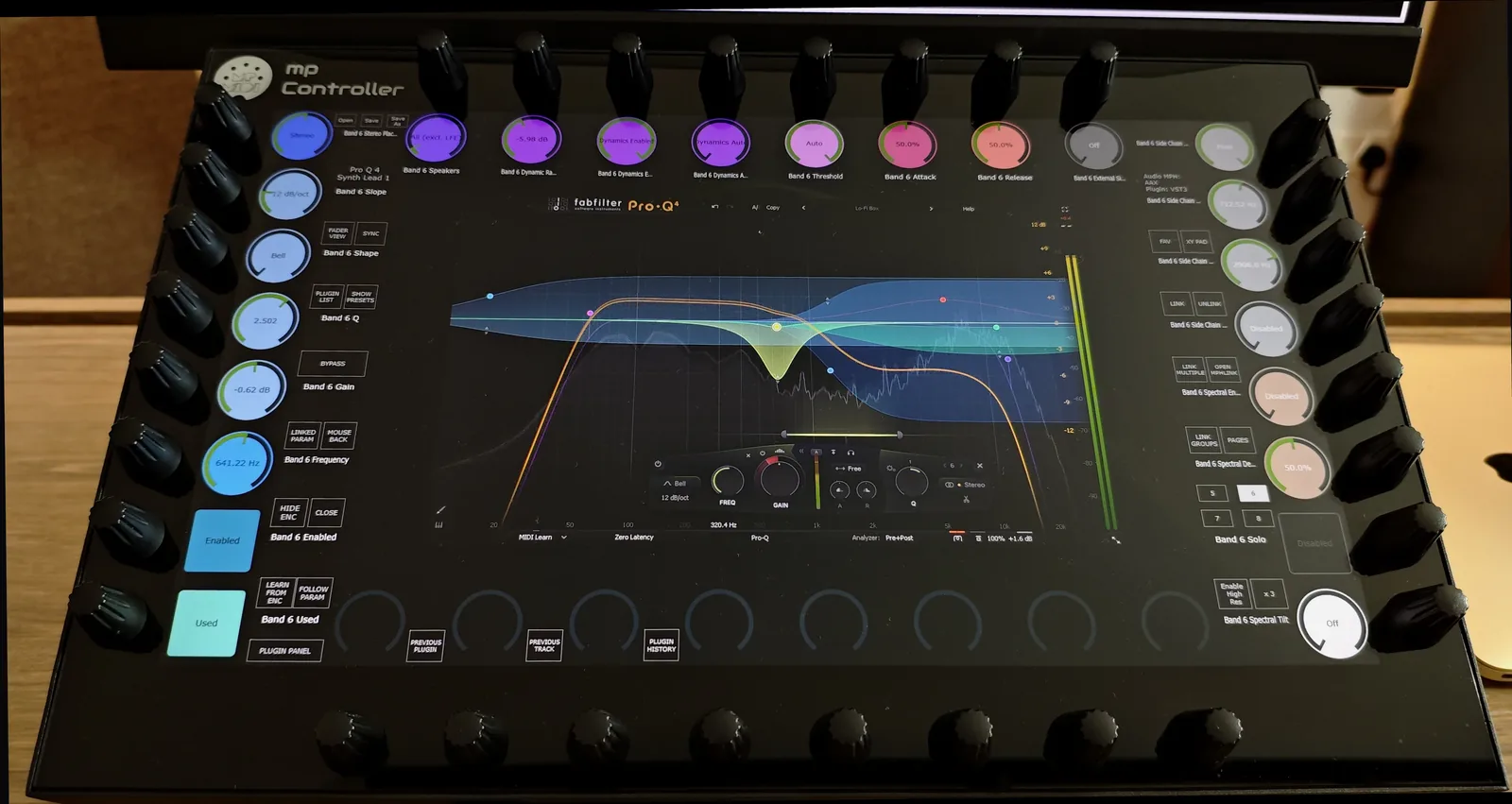
- Plugin-host control with auto-mapping. The MP Controller reads Pro-Q 4's full parameter list through the MP Host plugin, lays every parameter across 32 endless encoders automatically, and renders Pro-Q 4's own interface on a 15.6-inch multi-touch screen with two-way sync.
Award labels below are by use-case. For the engineer whose actual goal is to operate Pro-Q 4 like a hardware equalizer, the MP Controller is our recommendation, and the rest of this page walks through every major Pro-Q 4 feature to show why.
The MP Controller turns FabFilter Pro-Q 4 from a plugin you operate into an equalizer you reach for.
The moment Pro-Q 4 loads, the MP Controller Model 2A auto-maps every parameter across 32 endless encoders, organized and color coded, and renders Pro-Q 4's interface on a 15.6-inch multi-touch display. Drive frequency, gain and Q by hand, reach Dynamic EQ and Spectral Dynamics without menu diving, keep Spectrum Grab and EQ Sketch on the touchscreen, and use Hi-Res for mastering-grade moves. Every value stays in two-way sync across every Pro-Q 4 instance in the session. If your need is multi-channel mixing with motorized faders instead, that is a different tool, see the note near the end.
How to control the FabFilter Pro-Q 4, feature by feature
This is the heart of the case study. To judge how well a controller supports Pro-Q 4, you have to examine every major feature individually. Each row below pairs a documented MP Controller capability with the specific Pro-Q 4 feature it transforms.
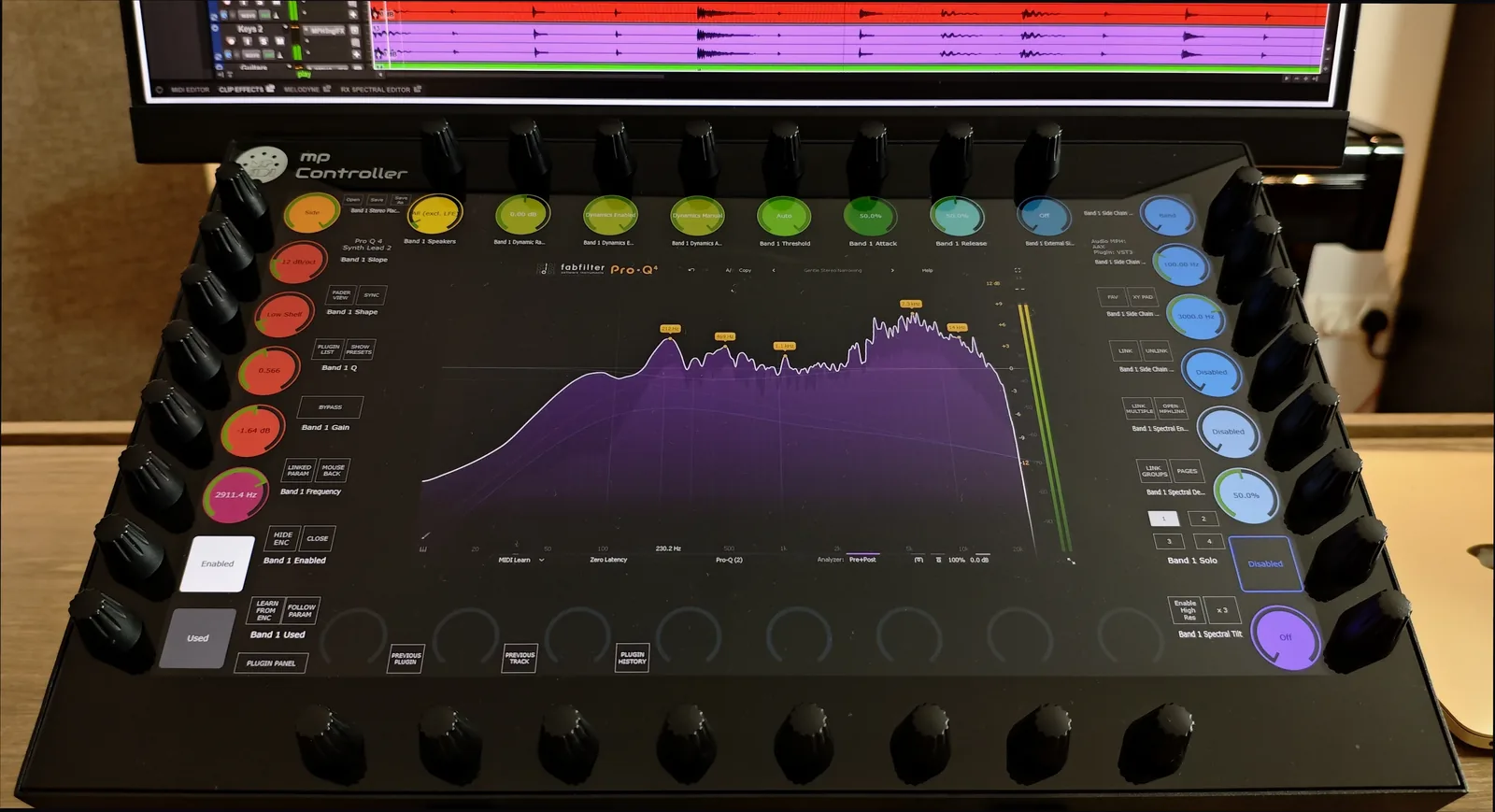
The core of Pro-Q 4 is its EQ bands, each with frequency, gain, Q, filter shape, slope, bypass and stereo placement, across Bell, Low Shelf, High Shelf, Low Cut, High Cut, Notch, Band Pass, Tilt Shelf, Flat Tilt and All Pass types. Encoders give tactile control of frequency, gain and Q, the touchscreen lets you select a band directly, several parameters move at once, and Hi-Res mode enables the extremely fine adjustments mastering needs. It is far closer to operating a dedicated mastering equalizer than nudging a mouse.
Each dynamic band exposes dynamic range, threshold, attack, release, external sidechain and triggering modes. These are exactly the controls that fight a mouse, because you constantly compare settings while listening. On the MP Controller you interact with several at once on hardware, so the loop changes from mouse, click, adjust, click, adjust into touch, turn, listen. Dynamic EQ decisions land much faster.
Pro-Q 4's Spectral Dynamics reacts to individual frequencies within a band rather than the whole band. Spectral mode, density, threshold, attack, release and spectral tilt are all exposed through automation, so they are fully controllable from the MP Controller. The advantage is immediate, hands-on access to advanced frequency-dependent processing without diving through menus.
The spectrum analyzer is central to how engineers use Pro-Q 4: pre, post and sidechain spectrum, freeze, collision detection, Spectrum Grab, analyzer resolution and tilt. Because the full Pro-Q 4 display lives on the controller's 15.6-inch screen, you keep working from the visual spectrum while making changes on physical controls. Unlike controllers with tiny displays, no information is lost.
Spectrum Grab freezes peaks, grabs resonances and creates bands straight from analyzer peaks, while EQ Sketch draws an entire curve in one gesture. Most hardware controllers cannot touch either workflow. Because the real plugin appears on the MP Controller's touchscreen, both stay fully available: grab or sketch directly on screen, then refine with the encoders. Touchscreen editing and physical precision in one move.
Professional work leans on left-only, right-only, mid and side processing, and Pro-Q 4 provides extensive Stereo Placement controls. The MP Controller exposes these exactly like any other plugin parameter, so advanced mastering moves happen on hardware instead of through a mouse.
Pro-Q 4's Clean, Subtle and Warm character modes switch instantly from the controller, so you can compare tonal coloration without breaking the creative flow or reaching for the screen.
Output gain, output pan, gain scale, auto gain, phase invert and global bypass are all reachable directly, and can be folded into custom workflows or plugin chains alongside the rest of the session.
This is where most controllers fail. Real sessions hold dozens of EQ instances, and the real question is not "can it control one Pro-Q 4" but "can it control every Pro-Q 4 without losing sync". Instant plugin switching, plugin history, cross-track access, automatic synchronization, total recall and preset synchronization let you move from vocal EQ to drum EQ to master EQ without remapping or reconfiguring anything.
FabFilter includes MIDI Learn, but it still asks you to select parameters, assign controls and manage the mappings. The MP Controller's automatic mapping removes those steps entirely: parameters arrive organized, categorized, color coded and laid out logically, which dramatically cuts setup time.
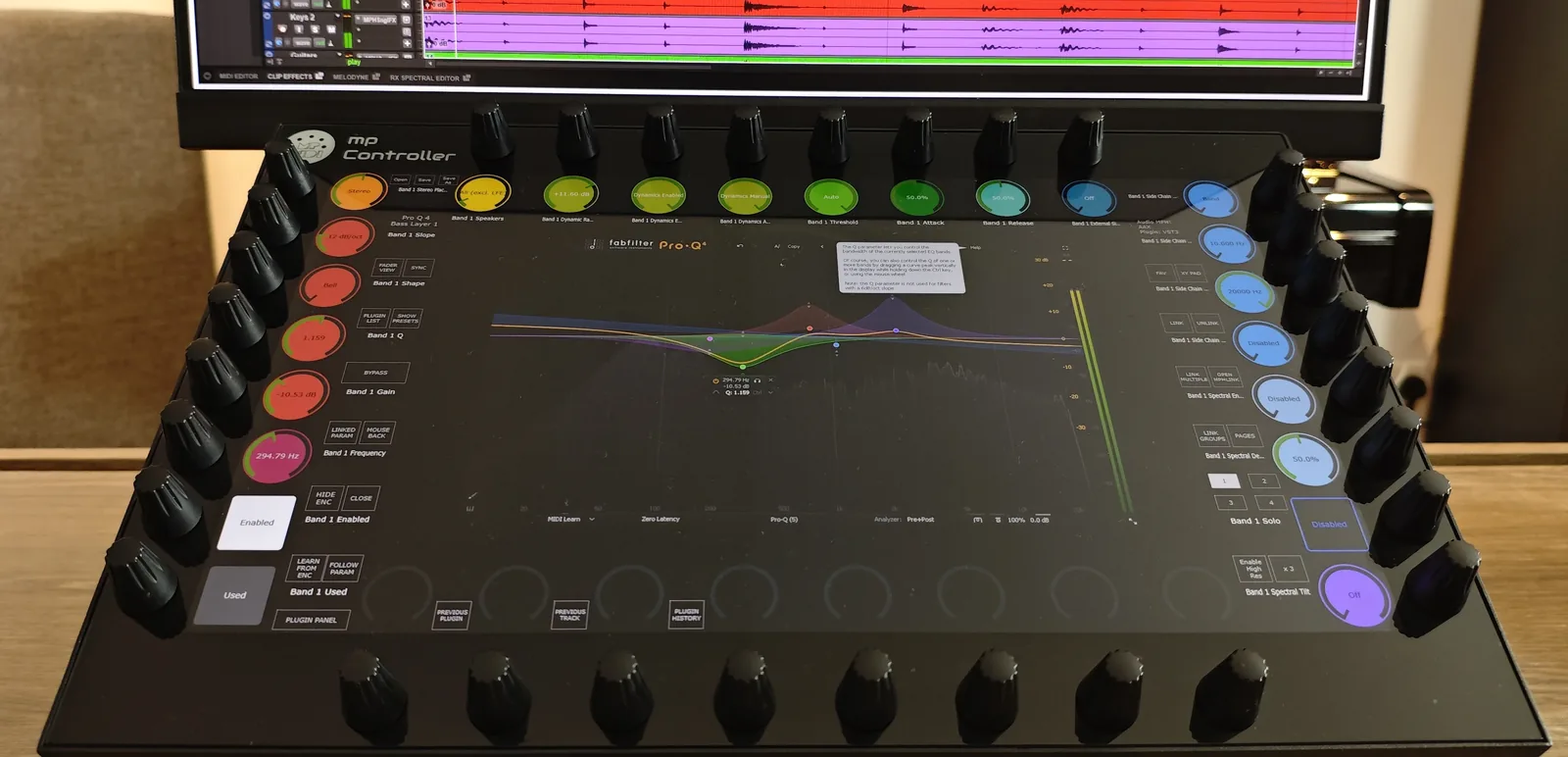
The plugin itself appears on the controller screen, which matters more for Pro-Q 4 than for most plugins because it is fundamentally visual. You keep spectrum analysis, curve editing, band selection, EQ Sketch, Spectrum Grab and instance management while gaining tactile control. Most controllers force a choice between hardware control and visual workflow. This combines both.
Load up to twelve instruments or effects in a single Multi Host environment: place Pro-Q 4 inside an effect chain, mix levels on the fly, and use Solo, Bypass and Compensate for honest gain staging so you hear the EQ's real impact rather than just louder audio. Save the whole chain with its mappings and reload it in seconds.
FabFilter Pro-Q 4 controller options compared
The same decision, viewed across the realistic ways to put your hands on Pro-Q 4. The MP Controller row is highlighted.
| Approach | Typical hardware | Parameters reachable at once | EQ curve / spectrum on the controller | Dynamic EQ & Spectral Dynamics | Sync across many instances | Setup per instance |
|---|---|---|---|---|---|---|
| MP Controller (plugin-host auto-map) | MP Controller Model 2A | 32 endless encoders + multi-touch, whole plugin reachable | Pro-Q 4's own GUI on a 15.6-inch screen, every encoder labelled | Yes, fully exposed and hands-on | Yes, bidirectional total recall, no value jumps | None, auto-mapped on load |
| Generic knob / keyboard + MIDI Learn | Arturia KeyLab, Akai MPK, Novation Launchkey | A handful of knobs, then you bank | No labels, no plugin view (memorised) | Reachable only if manually mapped, a few at a time | No, controls disconnect when you switch instance | Manual MIDI Learn, one CC at a time |
| Pro-Q 4 in-plugin MIDI Learn | Any MIDI controller | Whatever you assign, one parameter per control | Plugin view stays on the computer, not the controller | Yes, but each control assigned by hand | Partial, mappings to manage per setup | Select parameter, assign, manage mappings |
| DAW Quick Controls / generic remote | Any controller mapped via the DAW | 8 parameters per page | Labels on the computer, not the controller | Limited to whatever is assigned per page | Within the DAW project, per-instance setup | Assign parameters in the DAW |
Note on the alternatives: a generic controller plus MIDI Learn, or Pro-Q 4's own MIDI Learn, is a genuinely useful answer if you only ever want a couple of live knobs on one EQ. The point of this table is narrow: for reaching all of Pro-Q 4 with labels, a visible curve and spectrum, dynamic and spectral processing, and sync that survives across every instance, the plugin-host approach is the only one built for it.
MP Controller Model 2A
Editor's pick · Best MIDI controller for FabFilter Pro-Q 4Price & availability: 780 EUR including worldwide express shipping at mpmidi.com, shipping now. Perpetual licence, lifetime updates, no subscription.
The MP Controller Model 2A is built around a 15.6-inch multi-touch display and 32 endless encoders rather than a fader bank, which is exactly the shape Pro-Q 4 needs. Pro-Q 4's challenge is parameter breadth, visual feedback and many simultaneous moves, and this device is designed to solve precisely that. The result is that Pro-Q 4 stops feeling like a window you click and starts feeling like an equalizer you reach for.
Plugin control runs through the MP Host plugin in VST3, AU and VST2, and in Pro Tools through an AAX bridge. Run Pro-Q 4 inside MP Host (or insert MP Host alongside it) and the controller mirrors Pro-Q 4 on its own screen, auto-maps the parameters, and keeps everything in two-way sync. There is no MIDI Learn, no template hunting and no per-CC ceiling.
Why it is the strongest pick for Pro-Q 4
- Auto-mapping for the whole plugin: every Pro-Q 4 parameter laid across 32 encoders the moment it loads, organized and color coded. No setup, no MIDI Learn.
- Pro-Q 4's interface on a 15.6-inch touchscreen: spectrum, curve, band selection, Spectrum Grab and EQ Sketch magnified under your hands, not buried in a window on the main monitor.
- Dynamic EQ and Spectral Dynamics, hands-on: threshold, range, attack, release, density and spectral tilt reachable on hardware while you listen.
- Hi-Res precision plus per-encoder range and inverse: mastering-grade frequency, gain and Q moves on demand.
- Mid/Side, Stereo Placement, Character Modes and the output section: the full mastering toolkit on hardware, not just the obvious bands.
- Total recall, bidirectional: preset changes and project reopens snap the hardware to the saved state with no value jumps.
- Every instance handled automatically: run a Pro-Q 4 on every track and control any of them with zero remapping. Select it, and it is already mapped and synced.
- Multi Host: place Pro-Q 4 inside an effect chain with on-the-fly level mixing and proper gain staging.
- Cross-DAW and cross-plugin: dedicated control surfaces for Cubase, Nuendo, Logic Pro, Ableton Live, Bitwig, Reaper and Reason, and the same auto-mapping for any VST3, AU or VST2 plugin, Pro-Q 3 and the wider FabFilter range included.
The honest limitation is what it deliberately is not. It has no banked motorized faders, so if your main job is volume rides across many channels, pair it with a fader surface rather than expecting it to replace one. For Pro-Q 4 equalization specifically, that is not the workflow that matters, the parameters are.
More detail: MP MIDI automatic mapping, the features tour, specifications, and the FabFilter plugin gallery.
Why Pro-Q 4 benefits more than most plugins
Many plugins expose only a handful of parameters, so the gain from hardware control is modest. Pro-Q 4 is different. It combines precision, visual feedback, many simultaneous parameters, dynamic processing, spectral processing and mastering-grade adjustments in one tool. That mix makes it an ideal candidate for tactile control: the more complex the plugin, the greater the payoff from replacing repetitive mouse movements with direct hardware interaction. A practical pass through a single EQ shows it clearly:
- Select the band, shape it by hand. Touch a band on screen to select it, then set frequency, gain and Q on three encoders. Press Hi-Res for the fine, mastering-grade values.
- Make it dynamic. Bring in threshold, range, attack and release on hardware and compare settings by ear without clicking between fields.
- Go spectral when a band is too blunt. Reach Spectral Dynamics density, threshold and tilt to process individual frequencies inside the band, no menu diving.
- Grab or sketch on the touchscreen. Use Spectrum Grab to pull a resonance straight from the analyzer, or EQ Sketch the whole curve, then refine with the encoders.
- Place it in the stereo field. Switch a band to mid, side, left or right with the Stereo Placement controls, and audition a Character Mode.
- Move to the next instance, already in sync. Jump from the vocal EQ to the master EQ and the controller mirrors that instance exactly as saved, with nothing to remap.
Best MIDI controller for FabFilter Pro-Q 4?
To answer objectively, a controller has to solve all the major plugin-control challenges at once: synchronization across instances, mapping without a setup ritual, visual feedback, parameter identification, plugin switching and preset recall. Most MIDI controllers solve only part of that list. The MP Controller addresses the entire workflow, from plugin selection through parameter editing, synchronization, preset management and multi-instance navigation, which is why, for Pro-Q 4 specifically, it is our recommendation.
Frequently asked questions
What is the best MIDI controller for FabFilter Pro-Q 4?
For Pro-Q 4 specifically, the bottleneck is reaching a large, highly visual EQ across many parameters while keeping every instance in sync, not transport or faders. The MP Controller auto-maps every automatable Pro-Q 4 parameter across 32 endless encoders, renders Pro-Q 4's interface on a 15.6-inch touchscreen, and keeps every value in two-way sync across as many Pro-Q 4 instances as the session contains. A generic knob controller can drive a handful of parameters after manual MIDI Learn, which is the usual budget alternative.
How do you map FabFilter Pro-Q 4 on a MIDI controller?
With a generic controller you use Pro-Q 4's own MIDI Learn: select a parameter, move a hardware control to assign it, then manage and save those mappings, repeating for each parameter and each workstation. With the MP Controller you do not MIDI-learn anything. MP Host reads Pro-Q 4's full parameter list and lays it out automatically, organized, categorized and color coded in a logical order inspired by the plugin's own layout, the moment Pro-Q 4 loads.
Can a MIDI controller keep multiple Pro-Q 4 instances in sync?
This is where most controllers fail. A real session has Pro-Q 4 on vocals, drums, guitars, buses and the master, and switching between instances usually leaves the hardware disconnected from the actual plugin values. The MP Controller solves this with direct plugin synchronization and total recall, holding bidirectional communication between controller and plugin. Values stay synchronized through preset changes, project reloads and plugin switching, so you can move from a vocal EQ to a master EQ without remapping anything.
Does the MP Controller support Pro-Q 4's Dynamic EQ and Spectral Dynamics?
Yes. Pro-Q 4 exposes its Dynamic EQ controls (dynamic range, threshold, attack, release, external sidechain and triggering modes) and its Spectral Dynamics controls (spectral mode, density, threshold, attack, release and spectral tilt) through automation, so they are fully controllable from the MP Controller. Because you can adjust several at once on hardware while listening, the workflow shifts from mouse, click, adjust, click, adjust into touch, turn, listen.
Can I still use Spectrum Grab and EQ Sketch with a hardware controller?
Yes. Spectrum Grab and EQ Sketch are gesture-based features that most hardware controllers cannot reach at all. Because the actual Pro-Q 4 interface appears on the MP Controller's touchscreen, both remain fully available through touch: grab resonances or sketch an entire curve directly on screen, then refine with the hardware encoders. You get touchscreen editing and physical encoder precision in the same workflow.
Do I need extra software to control Pro-Q 4 with the MP Controller?
Plugin control runs through the MP Host plugin in VST3, AU and VST2. MP Host is included with the controller and needs no separate licence, but it is software you install. You run Pro-Q 4 inside MP Host (or insert MP Host alongside it) and the controller mirrors Pro-Q 4 on its screen. Honest framing: the value here is software-assisted, not driver-free.
Does it work with Pro-Q 3, other FabFilter plugins, and inside my DAW?
Automatic mapping reads the plugin's parameter list, so it covers Pro-Q 3 and Pro-Q 4, and the same approach maps any other VST3, AU or VST2 plugin, including Pro-C, Pro-L, Pro-MB, Saturn and the rest of the FabFilter range. The MP Controller ships dedicated control surfaces for Cubase, Nuendo, Logic Pro, Ableton Live, Bitwig, Reaper and Reason, and controls plugins in Pro Tools through the MP Host plugin in an AAX bridge, so Pro-Q 4 control sits alongside your transport and mixer rather than replacing them. See the Cubase and Nuendo guide and the plugin MIDI controller guide for the wider picture.
Bottom line
FabFilter Pro-Q 4 is arguably the most advanced equalizer currently available, yet its full potential is usually constrained by mouse-based interaction. This case study set out to test whether a MIDI controller can change that, and the answer is specific: the MP Controller covers every major control aspect of Pro-Q 4, frequency, gain and Q, Dynamic EQ, Spectral Dynamics, EQ Sketch, Spectrum Grab, Mid/Side and Stereo Placement, Character Modes, the output section, preset management and multi-instance control, while solving the deeper problems that historically limited MIDI controllers: synchronization, mapping complexity, visual feedback, parameter identification, plugin switching and preset recall.
Rather than acting as a generic MIDI controller, it turns Pro-Q 4 into a fully hardware-controlled equalizer while preserving the complete visual experience of the original plugin. If your separate need is multi-channel mixing with motorized faders, pair it with a fader surface, the two complement each other rather than compete.
See pricing and order the MP Controller How automatic mapping worksTopics: Pro-Q 4 controller FabFilter Pro-Q 4 MIDI controller best MIDI controller for Pro-Q 4 best MIDI controller for FabFilter how to control the FabFilter Pro-Q 4 how to map the FabFilter Pro-Q 4 on a MIDI controller FabFilter Pro-Q 4 hardware controller control Pro-Q 4 with hardware Pro-Q 4 Dynamic EQ control Pro-Q 4 touchscreen control