Why build plugins for a controller?
Automatic mapping works by reading a plugin's parameter list and arranging it into pages. That list was written by a developer thinking about a screen, not about 32 encoders, so even a good automap sometimes has to work around an odd parameter order or a control that only makes sense with a mouse.
When we design the plugin ourselves, that compromise disappears. The parameter order is chosen so that encoders follow the interface from left to right, buttons sit under the controls they belong to, and the global functions land on the same encoders every time. Turn a knob and the plugin tells you exactly which encoder moved and what it changed. That is the idea behind both releases.
MP Mix Placement: a 14-band placement filter bank
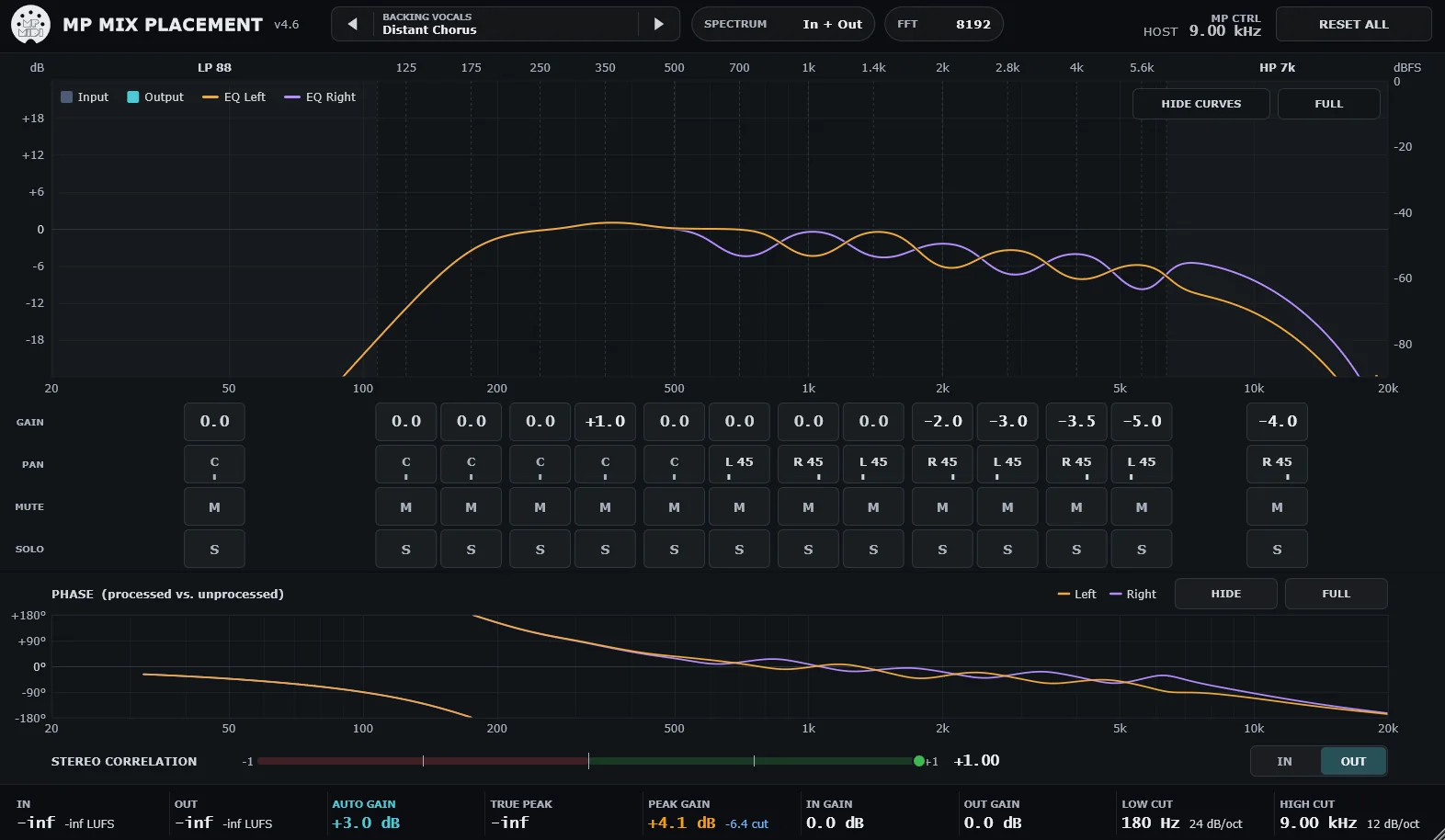
MP Mix Placement splits audio into 14 fixed bands and gives every band four things to play with: Gain (±18 dB), Pan, Mute and Solo, and Drive. It takes its inspiration from the fixed filter banks of the modular synthesizer era, but it is a new, independent design rather than an emulation of any particular circuit.
The bands are a low shelf at 88 Hz, twelve band-pass bands at 125, 175, 250, 350, 500, 700, 1000, 1400, 2000, 2800, 4000 and 5600 Hz, and a high shelf at 7 kHz. They are built to always add up to exactly one, so with every band at 0 dB the plugin is perfectly flat, and moving all bands together is exactly a volume change.
A tool for four mix questions
An ordinary EQ answers "what does this sound like?". MP Mix Placement is built around a different question: "where does this part live in the mix?". The documentation breaks that into four parts, each with its own preset family.
Where in frequency
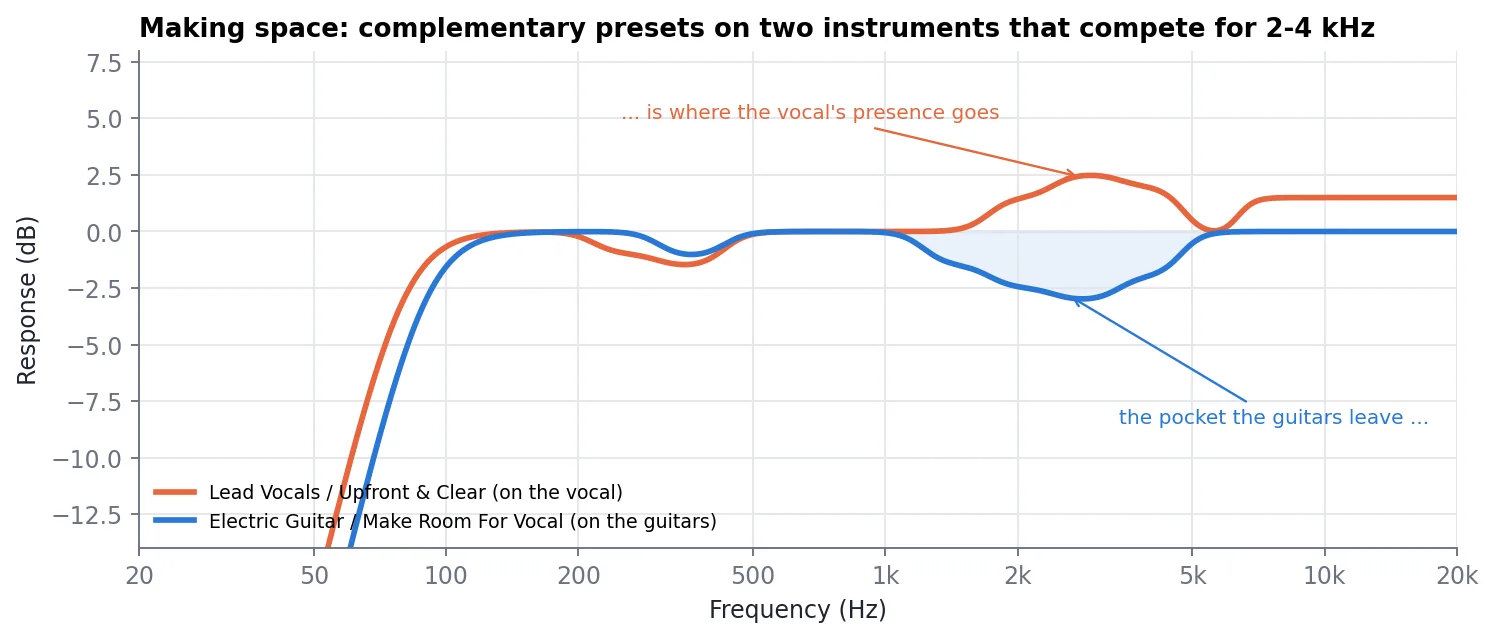
Make space so two parts stop fighting over the same range. Cut a pocket in one and lift the same area in the other.
Make Room · Remove Mud · De-Box
How near or far
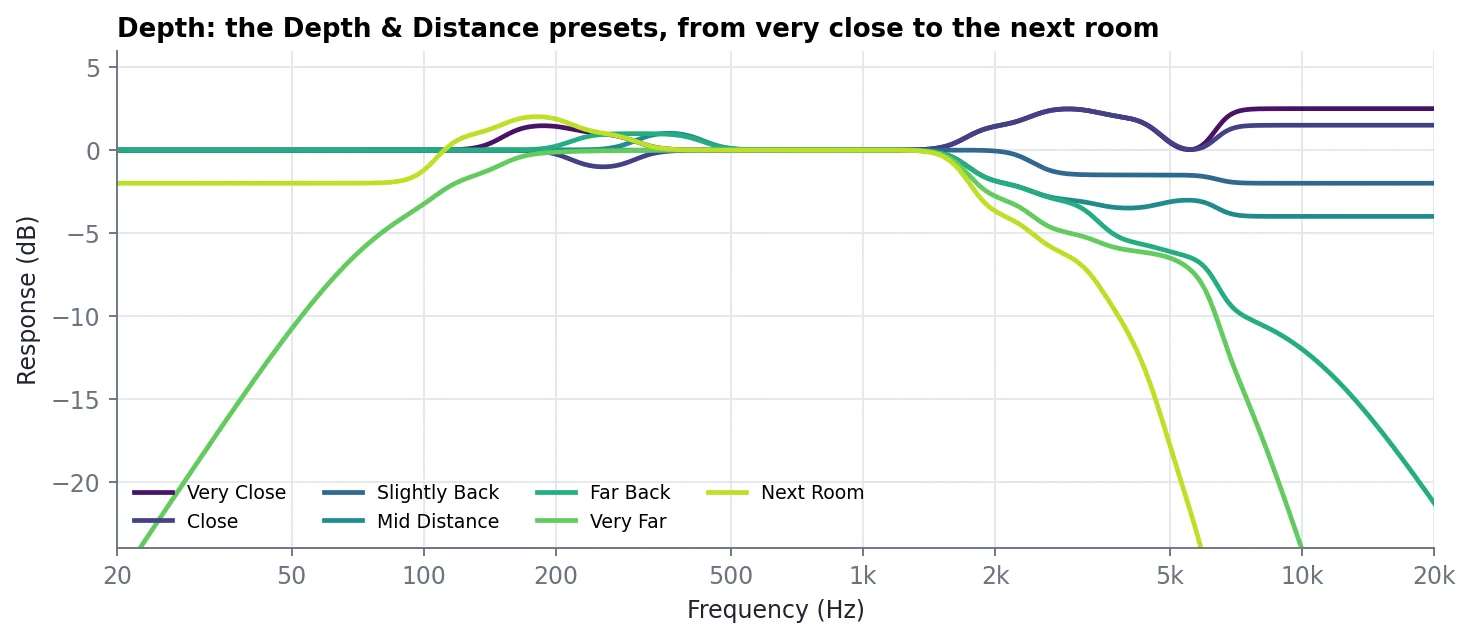
Bring a part forward or push it back. Presence lifts read as close, while softened highs and the output high cut read as distance.
Depth & Distance · Upfront & Clear · Sit Back In The Mix
How wide, and where
Pan individual bands to spread a part or nudge it left or right. Pan is a true balance control and never mixes the left signal into the right.
Stereo Placement · Rhythm Left / Right · Wide Stack
What character
Add odd and even harmonics to one band at a time with Drive, without changing that band's level.
Character & Saturation · Rock Grit · Vintage Thump
Laid out band by band on the encoders
This is where the plugin earns its place on the MP Controller. The parameters are ordered so the encoders follow the bands from low to high: two encoders per band for Gain and Pan, with Solo and Mute on the two buttons beneath them. Fourteen bands use encoders 1 to 28, and the last row handles the global controls.
| Control | Function |
|---|---|
| Encoders 1 to 28 | Gain and Pan for each band, LP 88 Hz on encoders 1/2 through HP 7 kHz on encoders 27/28 |
| Buttons 1 to 28 | Solo and Mute for each band, directly under its encoders |
| Encoder 29 / 30 | Input Gain / Output Gain (±24 dB) |
| Encoder 31 | Preset selector |
| Button 29 | Auto Gain on/off |
| Button 30 | Processing On/Off (also linked to host bypass) |
| Button 31 | Spectrum display mode: In + Out, Out, In or Curves |
| Page 3 | One encoder per band for Drive |
The header's MP CTRL readout names the last move, for example "ENC 09 BP 350 Hz Gain +7.5 dB", and highlights that band for a moment, so you always know which knob did what. It works the other way too: hover over or touch a Gain or Pan box and the matching encoder flashes on the controller. The preset encoder waits until you stop turning for 300 ms before it loads anything, so you can scroll through the library without triggering every preset on the way.
Zero latency, honest metering
Under the hood, the Natural engine is a minimum-phase FIR filter designed from the target curve and run through zero-latency partitioned convolution in 64-bit floating point. The result is 0 samples of latency, no pre-ringing, and a neutral setting that is bit-exact with the input. Drive costs no CPU at all when it is at 0.
- Auto Gain (on by default) keeps loudness constant while you shape, so louder never fools you into thinking better.
- Input Low Cut (10 to 1000 Hz) and Output High Cut (1 to 22 kHz), each Off or 6 to 48 dB/oct.
- Metering: peak, momentary loudness and true peak to BS.1770, a stereo correlation meter with IN/OUT switching, a phase panel and a PEAK GAIN headroom readout.
- Sample rates from 32 to 384 kHz, mono or stereo.
231 presets in 22 categories
The factory library covers instruments (Lead Vocals, Backing Vocals, Kick, Snare & Claps, Drums Overheads & Room, Percussion, Bass, Electric and Acoustic Guitar, Piano & Keys, Synth Pads, Synth Leads & Arps, Strings, Brass & Winds), tasks (Depth & Distance, Stereo Placement, Make Room, Character & Saturation) and contexts (FX & Ambience, Mix Bus & Mastering, Lo-Fi & Special, Dialogue & Podcast). Presets store only the settings that differ from the defaults, and your own go into a folder per category with SAVE AS.
- Set the balance with faders first, then insert MP Mix Placement on the parts that compete. Leave Auto Gain on.
- Solo two parts in the DAW to hear where they mask each other.
- Make room: a Make Room preset on the supporting part, a lift in the identity bands on the lead.
- Set depth with Depth & Distance: lead Close or Very Close, supporting parts Slightly Back, pads Far Back.
- Set width with Stereo Placement, and check that the OUT correlation stays clearly above 0.
- Add Drive last.
- Save your favourites with SAVE AS.
Controller EQ-01: the mixing and mastering EQ we always wanted
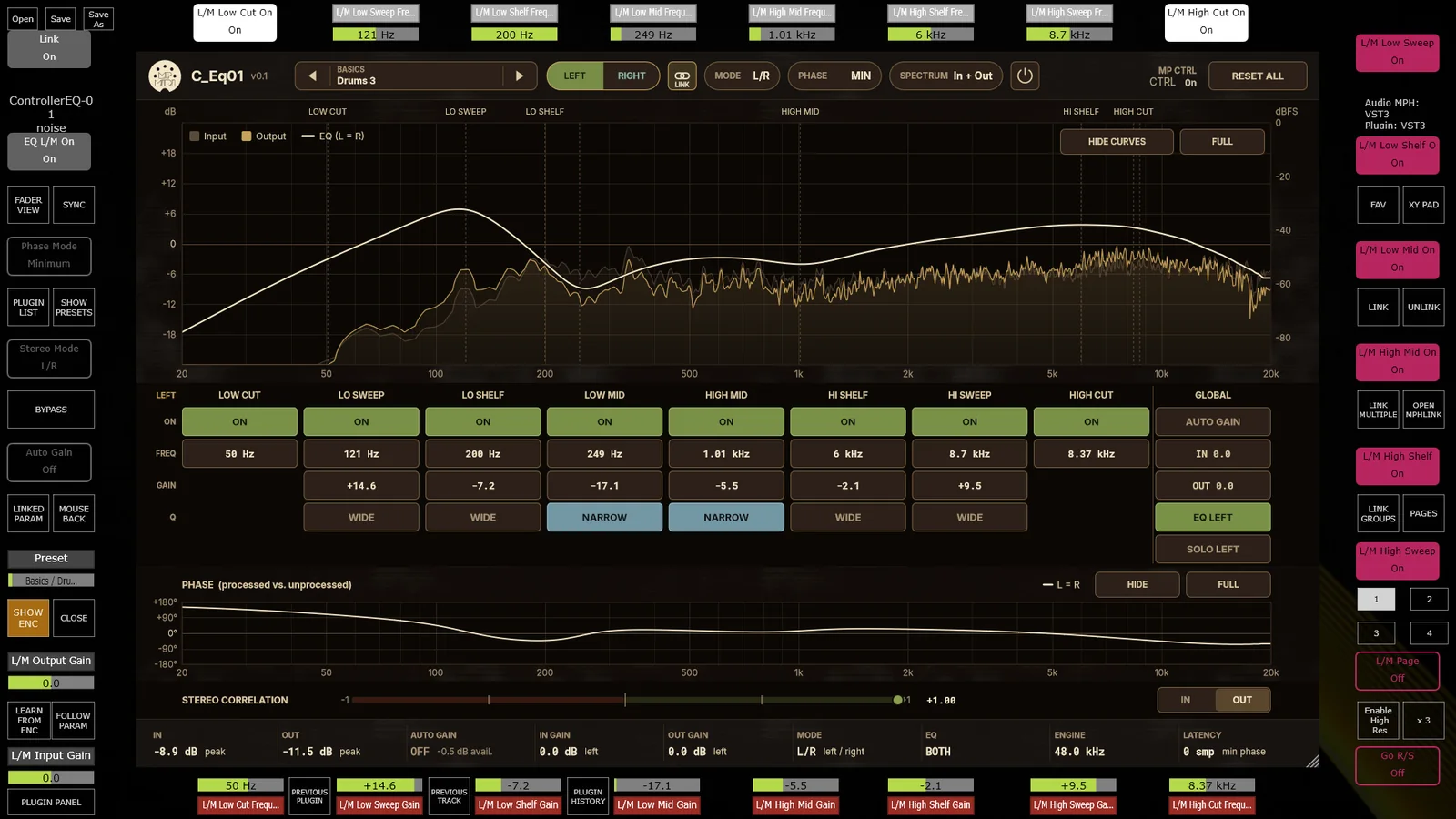
Controller EQ-01 is a faithful recreation of a classic analog equalizer for modern mixing and mastering. We analysed the frequency and phase responses of the original hardware and reproduced both its curves and its phase shift in a highly optimized plugin that needs very little CPU.
Like MP Mix Placement, it is made to run in MP Host and automap onto the MP Controller in an optimal way, so every parameter is in your hands as soon as it loads. The layout reads like the front panel of a hardware unit: a low cut, low sweep, low shelf, low mid, high mid, high shelf, high sweep and high cut, each with its own on/off switch and frequency, gain on every band between the two cuts, a Wide or Narrow bandwidth choice on the sweep, shelf and mid bands, and a global section with Auto Gain, input and output gain.
L/R and M/S, like a stereo hardware unit
The EQ works in Left/Right or Mid/Side mode. With the two channels linked, one set of controls drives both. Unlink them and the Left/Right or Mid/Side buttons on the controller take you straight to the page carrying that channel's parameters, so you work on each side exactly as you would on a two-channel hardware EQ. Mid/Side is where a mastering EQ shows its value: tighten the low end in the middle, open up the top on the sides, without touching the other.
Automatic gain compensation
Built-in automatic gain compensation keeps the output level constant while you tweak, so you judge the tonal change rather than the volume change.
Two phase modes: MIN and EXACT
Both modes have the same frequency response. They differ in phase, latency and pre-ringing, and you switch between them with the PHASE button in the plugin header or with encoder 6 on the MP Controller.
| MIN (default) | EXACT | |
|---|---|---|
| Latency | 0 samples | 1024 samples at 44.1 kHz (about 23 ms, the same time at every sample rate) |
| Phase | Minimum phase, built from the magnitude curve | The measured phase of the original EQ |
| Pre-ringing | None | Slight |
| Match to the hardware | Magnitude exact, phase within about 2° below 19 kHz | Magnitude exact, phase within 0.85° |
| CPU | Lowest | Slightly higher, more noticeable at 88.2/96 kHz |
| Best for | Tracking, live use, low-latency monitoring and almost all mixing | Nulling against the original, phase-coherent parallel processing and mastering reference |
The latency is reported to the host, so your DAW compensates for it automatically. Changing EQ settings in EXACT mode is seamless, with no dropouts or level dips. The phase panel below the spectrum always shows the measured phase, so you can see what each mode is doing.
Presets on encoder 3
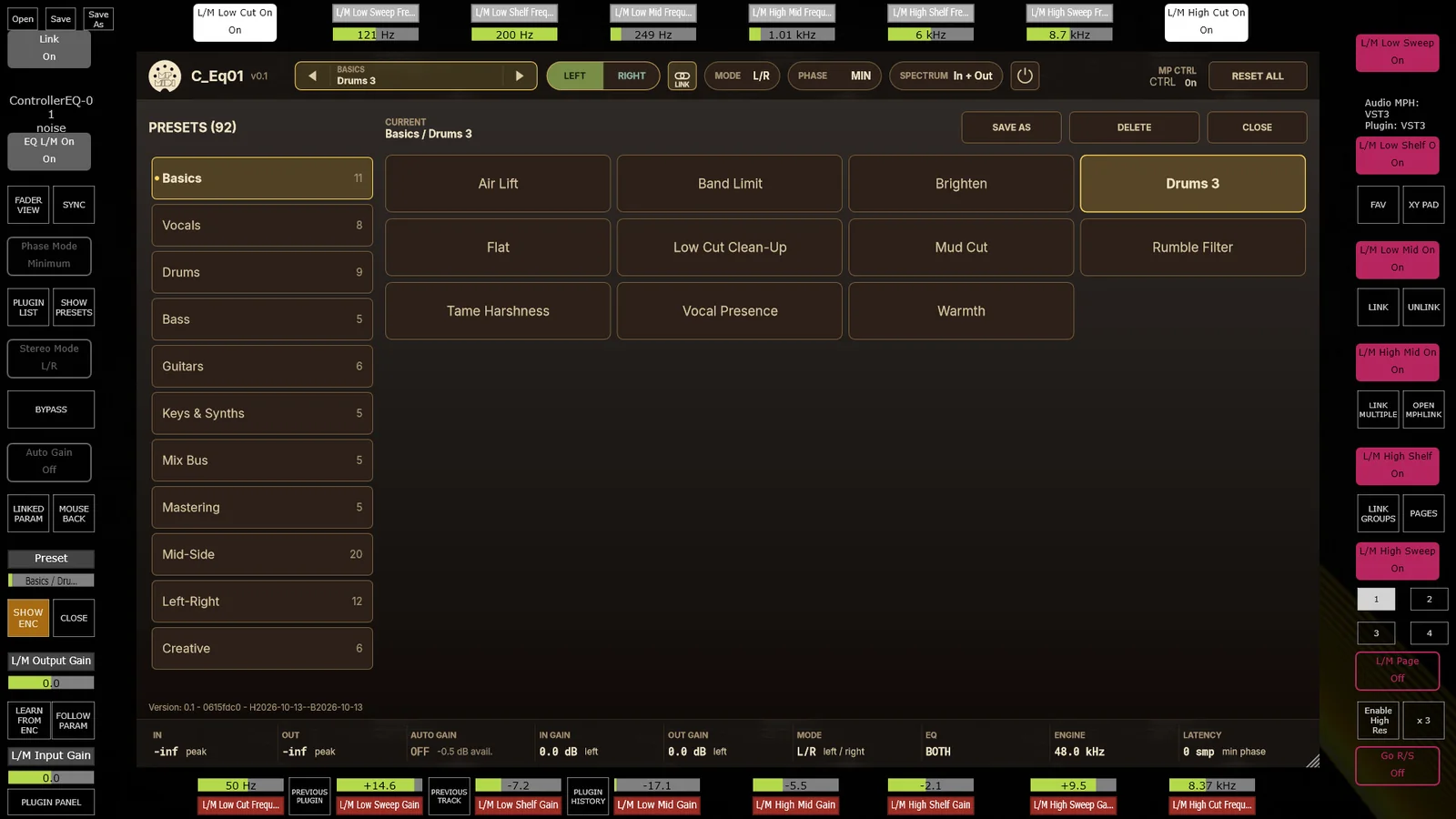
Encoder 3 browses the preset library. Categories cover the obvious starting points (Basics, Vocals, Drums, Bass, Guitars, Keys & Synths), the bus and mastering stage (Mix Bus, Mastering) and dedicated Mid-Side and Left-Right sets, plus a Creative folder for less polite moves.
Which one, when?
The two plugins overlap less than it might seem. MP Mix Placement is a placement tool: reach for it when a part is in the wrong place, masked by another part, too close, too far, too narrow or too clean. Its fixed bands and per-band pan make those decisions quick and repeatable. Controller EQ-01 is a tone-shaping and mastering EQ: reach for it when you want the sweep, shelves and character of a classic analog unit on a bus, a stem or the master, with Mid/Side control and a phase-exact option when it matters.
Used together, a typical chain is MP Mix Placement on individual tracks to place them, and Controller EQ-01 on the buses and the master to shape the result.
Load them in MP Host and start turning.
MP Mix Placement is free for all MP Controller owners. It is available as VST3 on Windows and as AU and VST3 on macOS, and uses the same licence as MP Host. Controller EQ-01 is documented in the same knowledge base. Both are made to run inside MP Host, which is how the MP Controller controls VST3, AU and VST2 plugins in any DAW, including Pro Tools through the AAX bridge plugin.
Bottom line
MP Mix Placement and Controller EQ-01 are the first plugins we have designed with the MP Controller as the starting point rather than the destination. One answers where each part sits in a mix: in frequency, in depth, in width and in character, with 14 bands laid out across the encoders from low to high. The other brings the curves, phase behaviour and Mid/Side workflow of a classic analog mastering EQ, with a zero-latency mode for everyday mixing and an exact-phase mode for when it counts. Both automap the moment they load, and both feel more like hardware than software.
See pricing and order the MP Controller How automatic mapping worksFAQ
What is MP Mix Placement?
MP Mix Placement is a 14-band placement filter bank: a low shelf at 88 Hz, twelve band-pass bands from 125 Hz to 5.6 kHz and a high shelf at 7 kHz. Every band has Gain, Pan, Mute, Solo and Drive. It is designed to help you decide where a part sits in a mix: in frequency, in depth, in the stereo field and in character.
Is MP Mix Placement free?
Yes. MP Mix Placement is free for all MP Controller owners. It uses the same licence as MP Host, so you need an MP Controller licence and MP Host installed.
Does MP Mix Placement add latency?
No. Its Natural engine is a minimum-phase FIR filter run through zero-latency partitioned convolution, so it reports 0 samples of latency and has no pre-ringing. With every band at 0 dB the output is bit-exact with the input.
What is the difference between MIN and EXACT phase in Controller EQ-01?
Both modes have the same frequency response. MIN is zero-latency minimum phase, the default, and suits tracking and almost all mixing. EXACT reproduces the measured phase of the original hardware to within 0.85 degrees at a cost of 1024 samples of latency at 44.1 kHz (about 23 ms) and slight pre-ringing, which suits nulling against the original, phase-coherent parallel processing and mastering reference work.
How do these plugins work with the MP Controller?
Both plugins are made to run in MP Host and automap onto the MP Controller. In MP Mix Placement the encoders follow the bands from low to high, two encoders per band for Gain and Pan, with Solo and Mute on the buttons below. In Controller EQ-01 encoder 3 browses presets, encoder 6 switches the phase mode, and the Left/Right or Mid/Side buttons jump to the page for each channel when the channels are unlinked.
Topics: MP Mix Placement Controller EQ-01 mix placement plugin fixed filter bank plugin mastering EQ plugin mid/side EQ zero latency EQ MP Host MP Controller plugins