Why Serum 2 is hard to control with a normal MIDI controller
Serum 2 is built for deep, gestural sound design. The Serum 2 User Guide describes a synth where each of the three oscillators (OSC A, OSC B and OSC C) can run as a wavetable, multisample, sample, granular or spectral engine, joined by dedicated sub and noise oscillators, fed through two filters with a large catalogue of filter types, then shaped by ten LFOs, four envelopes, eight macros and a sixty-four slot modulation matrix, before hitting a modular Serum FX rack of distortion, EQ, compression, chorus, flanger, phaser, delay, reverb and more.
That is the problem in one sentence: the sound lives in motion across dozens of controls at once, but a typical MIDI controller gives you about eight knobs and a manual setup ritual to reach any of them.
- You map one CC at a time, by hand. Serum's own MIDI Learn waits for a single incoming CC and assigns it to a single control, then the map is saved per preset and only reloaded if you enable the "Load MIDI Map from Preset" preference. Mapping a serious patch this way is slow, and you redo it for every plugin.
- Eight knobs cannot reach a patch in motion. Wavetable position, warp, unison detune, filter cutoff and resonance, an LFO rate and two macros already exceed a single knob row. You bank, you lose your place, you reach for the mouse anyway.
- The knobs have no labels and no memory of what they do. A generic encoder does not know it is on "WT POS" right now, so you memorise the layout, and it cannot follow Serum when a control changes meaning.
- Serum 2 has parameters that rename themselves. The secondary Warp control changes function with the warp mode, and the filter VAR control changes meaning with each filter type (FREQ, MORPH, FORMNT, DB and others). A fixed-CC knob keeps sending the same number while the thing it controls has quietly become something else.
How we approached this guide
Controlling Serum 2 is a different question from "which control surface should I buy for my DAW". The bottleneck is not transport buttons or motorized faders, it is parameter access: getting your hands onto Serum's hundreds of controls without a setup ritual, and keeping the controller honest about what each control is doing right now. We grouped the realistic options into three approaches and weighed each against that bottleneck.
- Generic MIDI knob or keyboard controller plus MIDI Learn. The default budget path. Around eight knobs, mapped one CC at a time, no parameter labels on the hardware and no awareness of Serum's dynamic controls.
- DAW Quick Controls or a generic remote. Eight parameters exposed through the DAW, configured in the DAW, with labels on the computer screen rather than on the controller, and no view of the Serum interface itself.
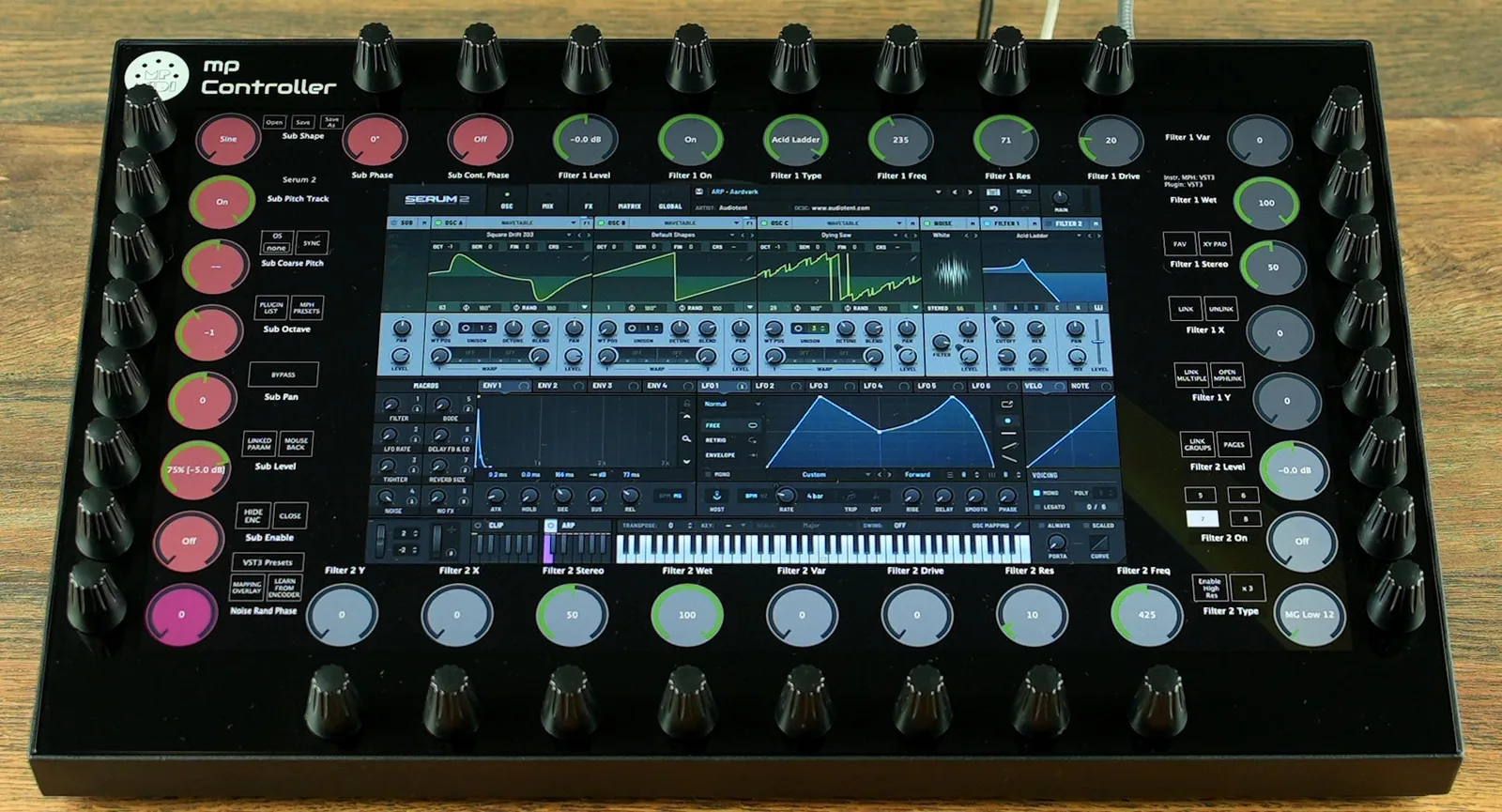
- Plugin-host control with auto-mapping. The MP Controller reads Serum 2's full parameter list through the MP Host plugin, lays every parameter across 32 endless encoders automatically, and renders Serum's own interface on a 15.6-inch multi-touch screen with two-way sync.
Award labels below are by use-case. For the producer whose actual goal is to play Serum 2, the MP Controller is our recommendation, and the rest of this page explains feature by feature why.
The MP Controller turns Serum 2 from a plugin you operate into an instrument you perform.
The moment Serum 2 loads, the MP Controller Model 2A auto-maps every parameter across 32 endless encoders, organised and colour-coded, and renders Serum's interface on a 15.6-inch multi-touch display. Press Hi-Res for microscopic wavetable and filter sweeps, use the XY pad for Serum's granular X|Y and filter morphs, and rely on dynamic parameter sync so the labels always match Serum's Warp and filter VAR controls. Every value stays in two-way sync with the patch. If your need is multi-channel mixing with motorized faders instead, that is a different tool, see the note near the end.
Feature by feature: how the MP Controller changes Serum 2 control
This is the heart of the guide. Each row pairs a documented MP Controller capability with the specific Serum 2 feature it transforms.
Load Serum 2 and its full parameter set lays itself out across the encoders instantly, organised, colour-coded and grouped by section (oscillators, sub, noise, filters, LFOs, envelopes, macros, FX). No MIDI Learn, no templates, no per-CC ritual. This is the single biggest change: Serum 2's hundreds of parameters become reachable the second the plugin opens, and the same applies to every other instrument you load.
Serum 2's interface renders on the controller's 15.6-inch touchscreen, so the wavetable display, the warp curve, the granular field and the spectral view sit directly under your hands. Magnify the part you are editing instead of squinting at a plugin window buried on a crowded monitor. Your eyes stay on the controller, your ears stay on the sound.
Drive WT POS, Warp, unison detune and filter cutoff with endless encoders. Map Serum's granular X|Y control, or filter cutoff against resonance, to a single XY pad and move two parameters at once. Throw the eight macros and the oscillator, sub, noise and bus levels onto large on-screen faders for expressive, automatable moves. Pick the gesture that fits the parameter.
In Serum you hold Shift and drag with the mouse for fine values. The MP Controller has a Hi-Res button that switches every encoder to high-precision at once, ideal for slow wavetable-position sweeps, tiny detune offsets, surgical cutoff automation and formant shifts. Set per-encoder sensitivity, range and inverse behaviour, so one knob can be fast and the next can be a scalpel.
Touch any Serum 2 parameter on the screen and the linked encoder begins blinking. With a synth this deep, knowing exactly which physical control moves "Filter 1 Cutoff" or "OSC A Warp" without hunting through pages is the difference between flow and friction. Within minutes the layout becomes muscle memory.
This is the feature Serum 2 specifically needs. The secondary Warp control changes function with the warp mode, and the filter VAR control changes meaning with each filter type (FREQ, MORPH, FORMNT, DB and more). The controller receives the new parameter name and value the moment it changes, so the on-screen label always matches reality. A fixed-CC controller cannot do this.
Control is two-way. Change a Serum 2 preset and the encoders and faders jump to the saved values instantly, with no value jumps the next time you touch them. Reopen a DAW project and the controller mirrors every Serum parameter exactly as it was saved, the same way your DAW recalls automation. Draw an LFO or move a macro on screen and the hardware follows.
A real track runs more than one Serum 2: a bass on one channel, a lead on another, pads and FX elsewhere. With a MIDI-Learn controller, each instance is a fresh mapping chore. Here there is nothing to redo. Auto-mapping reads the parameter list, which is identical across instances, so every Serum 2 in the session is already mapped. Select any instance from the touchscreen or your DAW and the controller instantly shows it, mapped and in full sync with that instance's values. Just load and control.
Beyond Serum's eight internal macros, assign multiple Serum parameters to a single encoder with custom ranges, sensitivities and inverse behaviour, then save the layout as a preset that reloads every time Serum opens. Build a single "morph" knob that opens a filter, pushes warp and detunes unison together, the kind of performance control a mouse cannot give you.
Load up to twelve instruments or effects in a single Multi Host environment: stack several Serum 2 instances, or run Serum into an effect chain, and mix their levels on the fly. Mute, solo and power plugins instantly, and use Solo, Bypass and Compensate for honest gain staging so you hear a plugin's real impact, not just louder audio. Save the whole chain with its mappings and reload it in seconds.
Find and load Serum 2, its presets, favourite chains and saved mappings directly from the controller, without reaching for the computer. Switch between Serum and the other plugins in your session straight from the touchscreen, so a sound-design session never breaks stride.
Serum 2 controller options compared
The same decision, viewed across the three realistic ways to put your hands on Serum 2. The MP Controller row is highlighted.
| Approach | Typical hardware | Parameters reachable at once | Labels / plugin view on the controller | Serum dynamic params (Warp / filter VAR) | Total recall & two-way sync | Setup per plugin |
|---|---|---|---|---|---|---|
| MP Controller (plugin-host auto-map) | MP Controller Model 2A | 32 endless encoders + multi-touch, whole patch reachable | Serum's own GUI on a 15.6-inch screen, every encoder labelled | Yes, names and values update live | Yes, bidirectional, no value jumps | None, auto-mapped on load |
| Generic knob / keyboard + MIDI Learn | Arturia KeyLab, Akai MPK, Novation Launchkey | ~8 knobs, then you bank | No labels, no plugin view (memorised) | No, CC stays fixed when the control changes meaning | Partial, value can jump unless high-res CC | Manual MIDI Learn, one CC at a time, per preset |
| DAW Quick Controls / generic remote | Any controller mapped via the DAW | 8 parameters per page | Labels on the computer, not the controller | No | Yes, within the DAW project | Assign parameters in the DAW |
| NKS / Komplete Kontrol | NI Komplete Kontrol keyboards | 8 knobs across NKS pages | Curated NKS pages on small screens, not the full Serum GUI | No, depends on the fixed NKS map | Yes, via NKS | Relies on NKS mapping being available for the sound |
Note on the alternatives: a generic controller plus MIDI Learn is a genuinely good budget answer if you only ever want a couple of live knobs on a patch, and NKS is excellent inside the Native Instruments ecosystem. The point of this table is narrow: for reaching all of Serum 2 with labels, dynamic-parameter awareness and total recall, the plugin-host approach is the only one built for it.
MP Controller Model 2A
Editor's pick · Best controller for Serum 2 sound designPrice & availability: 780 EUR including worldwide express shipping at mpmidi.com, shipping now. Perpetual licence, lifetime updates, no subscription.
The MP Controller Model 2A is built around a 15.6-inch multi-touch display and 32 endless encoders rather than a fader bank, which is exactly the shape Serum 2 needs. Serum's challenge is parameter breadth and motion, and this device is designed to solve parameter breadth and motion. The result is that Serum stops feeling like a screen you click and starts feeling like an instrument you reach for.
Plugin control runs through the MP Host plugin in VST3, AU and VST2. Run Serum 2 inside MP Host (or insert MP Host alongside it) and the controller mirrors Serum on its own screen, auto-maps the parameters, and keeps everything in two-way sync. There is no MIDI Learn, no template hunting and no per-CC ceiling.
Why it is the strongest pick for Serum 2
- Auto-mapping for the whole patch: every Serum 2 parameter laid across 32 encoders the moment it loads, organised and colour-coded. No setup, no MIDI Learn.
- Serum's interface on a 15.6-inch touchscreen: wavetable, granular and spectral displays magnified under your hands, not buried in a window on the main monitor.
- Dynamic parameter sync: the only approach here that follows Serum's Warp and filter VAR controls as they change function, relabelling the encoder live.
- Hi-Res precision plus per-encoder range and inverse: microscopic wavetable and cutoff sweeps on demand, the digital equivalent of Shift-dragging every knob at once.
- XY pads and large on-screen faders: a natural home for Serum's granular X|Y, filter morphs, and the eight macros.
- Total recall, bidirectional: preset changes and project reopens snap the hardware to the saved state with no value jumps.
- Every instance handled automatically: run ten Serum 2 instances in a project and control any of them with zero remapping. Select it, and it is already mapped and synced.
- Multi Host: layer up to twelve Serum 2 instances or run Serum into an effect chain, with on-the-fly level mixing and proper gain staging.
- Cross-DAW and cross-plugin: dedicated control surfaces for Cubase, Nuendo, Logic Pro, Ableton Live, Bitwig, Reaper and Reason, and the same auto-mapping for any VST3, AU or VST2 plugin, Serum 1 and Serum 2 included.
The honest limitation is what it deliberately is not. It has no banked motorized faders, so if your main job is volume rides across many channels, pair it with a fader surface rather than expecting it to replace one. For Serum 2 sound design specifically, that is not the workflow that matters, the parameters are.
More detail: MP MIDI automatic mapping, the features tour, specifications, and the Xfer Records plugin gallery.
A practical Serum 2 sound-design session on the controller

To make the difference concrete, here is how a single patch comes together when the controller is doing the reaching for you:
- Start from the wavetable. Encoders for OSC A WT POS, unison voices and detune are already mapped. Press Hi-Res and sweep WT POS slowly to find the frame you want, then back off the detune by a hair.
- Shape with warp. Choose a warp mode on the touchscreen. Dynamic parameter sync relabels the secondary warp encoder to match (Sync, Bend, PWM, Asym, Remap, or a distortion type), so the knob always says what it does.
- Open the filter as a gesture. Put Filter 1 Cutoff and Resonance on the XY pad and play the filter with one finger, or assign cutoff to a custom encoder that also nudges warp for a single "brightness" control.
- Add movement. The ten LFOs and four envelopes are mapped too. Adjust an LFO rate and depth on hardware, watch Serum's graph update on the main screen, all in two-way sync.
- Perform with macros. Serum's eight macros sit on large faders. Ride them live, or build your own multi-parameter encoder on top for a move Serum's macros alone cannot make.
- Recall it perfectly. Save the preset, reopen the project next week, and every encoder is back exactly where you left it.
Frequently asked questions
What is the best MIDI controller for Serum 2?
For Serum 2 specifically, the bottleneck is parameter access, not transport or faders. The MP Controller auto-maps every Serum 2 parameter across 32 endless encoders, renders Serum's interface on a 15.6-inch touchscreen, and keeps every value in two-way sync. A generic knob or keyboard controller can drive about eight parameters after manual MIDI Learn, which is the usual budget alternative. NKS keyboards are strong inside the Native Instruments ecosystem but surface a curated subset through small screens.
Do I have to MIDI-learn every Serum 2 knob by hand?
With a generic controller, yes. Serum 2's native MIDI Learn assigns one incoming CC to one control at a time, saves the map per preset, and only reloads it if the "Load MIDI Map from Preset" preference is enabled. With the MP Controller you do not MIDI-learn anything: MP Host reads Serum's full parameter list and lays it out automatically the moment Serum loads.
Does it handle Serum 2 controls that change name, like Warp and the filter VAR knob?
Yes, and this is the feature Serum 2 most needs from a controller. The secondary Warp control changes function with the warp mode, and the filter VAR control changes meaning with each filter type (FREQ, MORPH, FORMNT, DB and others). The MP Controller's dynamic parameter sync receives the new name and value as it changes, so the encoder label always matches what the knob is doing. A fixed-CC controller keeps sending the same number while the control has become something else.
Will it stay in sync when I change Serum 2 presets or reopen a project?
Yes. Control is bidirectional. Change a preset and the encoders and faders snap to the saved values with no value jumps when you next touch them. Reopen a DAW project and the controller mirrors every Serum parameter exactly as saved, the same way your DAW recalls automation.
Can it control multiple instances of Serum 2 in the same project?
Yes, with no extra setup. Because mapping is automatic and reads the plugin's parameter list, which is identical for every instance, each Serum 2 in your project is already mapped. You never remap per instance. Select any instance from the controller touchscreen or by focusing its track in the DAW, and the controller instantly shows that instance, mapped and in sync with its values. Run a bass, a lead and three pads on five separate Serum 2 instances and you control all five with the same effortless load-and-control workflow.
Do I need extra software to control Serum 2 with the MP Controller?
Plugin control runs through the MP Host plugin in VST3, AU and VST2. MP Host is included with the controller and needs no separate licence, but it is software you install. You run Serum 2 inside MP Host (or insert MP Host alongside it) and the controller mirrors Serum on its screen. Honest framing: the value here is software-assisted, not driver-free.
Does it work with Serum 1, other synths, and inside my DAW?
Auto-mapping reads the plugin's parameter list, so it covers Serum 1 and Serum 2, and the same approach maps any other VST3, AU or VST2 instrument or effect. The MP Controller ships dedicated control surfaces for Cubase, Nuendo, Logic Pro, Ableton Live, Bitwig, Reaper and Reason, so Serum control sits alongside your transport and mixer rather than replacing them. See the Cubase and Nuendo guide and the plugin MIDI controller guide for the wider picture.
Bottom line
Serum 2 rewards hands-on, in-motion sound design, and punishes the click-one-parameter-at-a-time workflow a mouse forces on you. A generic MIDI controller helps a little: about eight knobs, mapped by hand, with no labels and no awareness of Serum's shifting controls. The MP Controller is built for the actual problem: it auto-maps the whole patch across 32 encoders, shows Serum's interface on a 15.6-inch touchscreen, follows Serum's dynamic parameters live, adds hi-res precision and XY control, and keeps everything in total two-way recall.
If you want to play Serum 2 rather than operate it, this is the Serum 2 controller to get. If your separate need is multi-channel mixing with motorized faders, pair it with a fader surface, the two complement each other rather than compete.
See pricing and order the MP Controller How automatic mapping worksTopics: Serum 2 controller best MIDI controller for Serum 2 Serum 2 MIDI controller Xfer Serum 2 hardware controller control Serum 2 with hardware Serum 2 auto map wavetable synth controller VST plugin controller Serum 2 touchscreen control Serum 2 macros